
Introduction
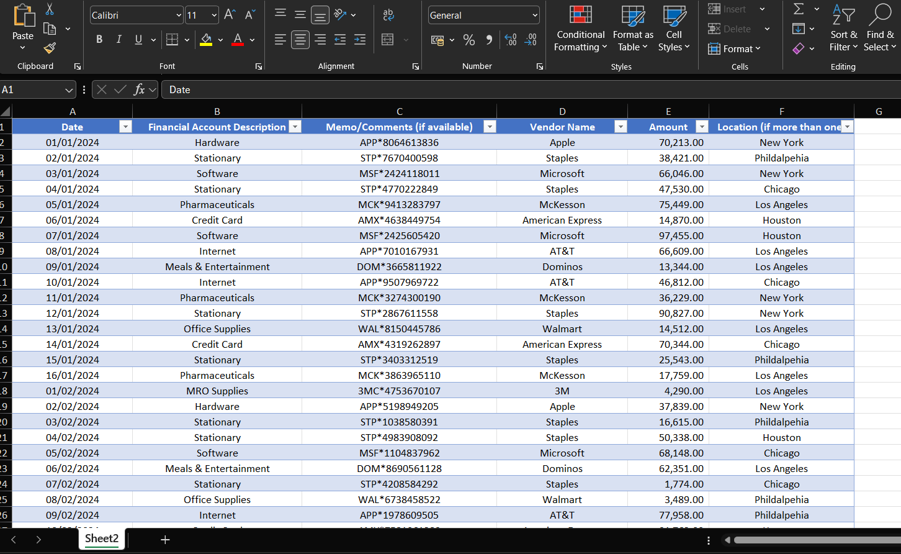
When uploading client ledger data for Spend Analysis it is important that it meets the following standards or the quality of the final presentation will be affected, there are 6 columns that can be added with only a few of these being absolutely required.
Columns
Date
The first column is the date, this column is a requirement,please ensure that the date contains month day and year, the format can be mm/dd/yyyy, dd/mm/yyyy or yyyy/mm/dd. Also please ensure that only 12 months’worth of data has been uploaded.
Financial Account Description
The financial account description column is not required but can be helpful as the tool will use this to further categorise the company,this column will be a text field with a description of the transaction.
Memo/comments
This column is similar to the financial account description and can also be used in some cases to categorize the transaction.
Vendor Name
This column is required as without the vendor name, we will not be able to categorize the transaction, please ensure that this is a text field.
Amount
The amount column is also required, the amounts will need to be formatted as a number, and the currency will need to be the same.
Also make sure sub-totals aren’t included in this
Location
The final column is location, this is optional, as it only applies to a couple of visuals in the final presentation, this is a text field.
Other Notes
· The spreadsheet you are uploading only contains1 sheet with the information
· The data does not need to be formatted as a table, but this would be best practice
· The data should start from cell a1 in the spreadsheet you are uploading
· The text in the spreadsheet can be written indifferent languages
Example of a good data upload:























.jpg)
.jpg)
.jpg)
.jpg)
.jpg)